FOR MERCHANTS & DIGITAL PLATFORMS

Every payment.One powerfulconnection.

A payment integration for your website or app.
A connected commerce portal for digital products.

01Unified integration
03Connected portals
04Core channel types
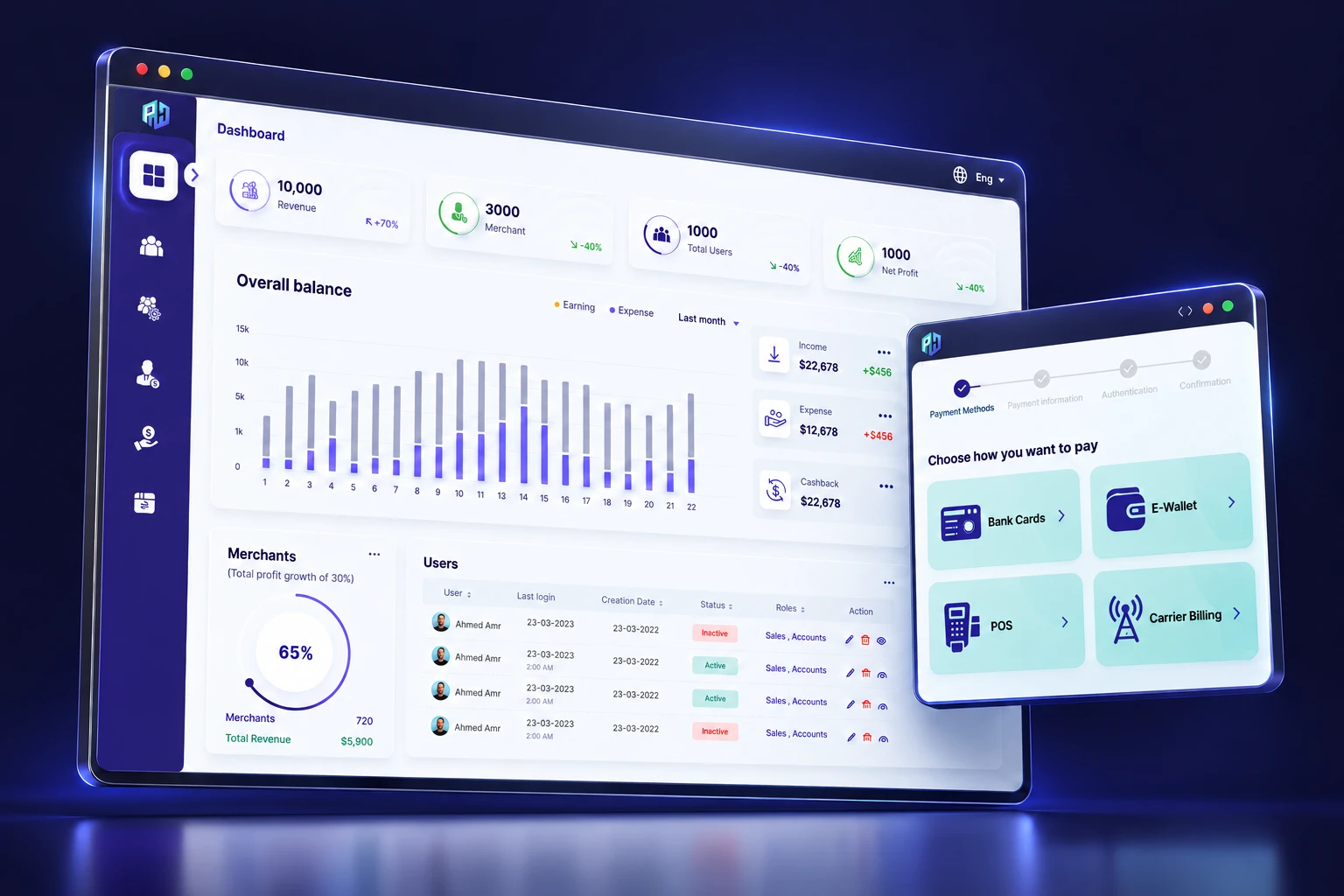
3D visualization of Payment Hub’s admin dashboard and checkout, with indigo navigation and mint payment options
YOUR PAYMENTS. THE COMPLETE PICTURE.3D product visualization · Sample data

01 / THE OPPORTUNITY

PAYMENT CHOICE IS GOOD FOR BUSINESS.

More payment options.
More moving parts.

Every new channel can mean another setup, another integration, and another set of numbers to reconcile.

Payment Hub brings those moving parts
into a single operating picture.

01

Integration work repeats.

Each provider adds setup effort, code to maintain and another relationship to manage.
02

The financial picture fragments.

Sales and transaction data spread across systems, making daily oversight harder.

03

Reconciliation takes more effort.

Teams work across payment partners to understand what happened and what needs attention.

THE IDEA IS SIMPLE

Let payment choice expand.
Keep the connection simple.

HOW PAYMENT HUB FITS

Keep your existing product.
Or sell through the portal.

01 / CONNECT YOUR BUSINESS

For your existing website or app

Use one Payment Hub integration to reach supported payment channels. Merchant and admin portals support the operation around those payments.

02 / SELL DIGITAL PRODUCTS

For digital merchants and publishers

Offer products or subscriptions through the customer portal. With the required account integration, game developers can connect digital asset purchases to a buyer’s account.

02 / THE PLATFORM

A SINGLE CONNECTION CHANGES THE PICTURE.

One integration.
A connected ecosystem.

Connect your website or app to supported payment channels. The merchant, customer and admin portals bring the commerce experience around that connection.

01

Connect once.

One integration point reduces repeated setup and code complexity.

02

Offer more choice.

Reach supported payment channels through a common platform.

03

Bring it all into view.

Monitor transactions and consolidate reconciliation across partners.

Channel availability depends on the market, payment partners and agreed integration scope.

03 / INSIDE THE PRODUCT

BUILT AROUND THE PEOPLE WHO USE IT.

One payment solution.
Three connected portals.

18 features across the merchant, end user and admin portals.
Explore what each one does for the people using it.

PORTAL 01 / 03

Merchant portal.

The workspace behind every sale.

Manage your offer, understand your customers and follow the money — from the first product listing to subscriptions and payouts.
Explore six features
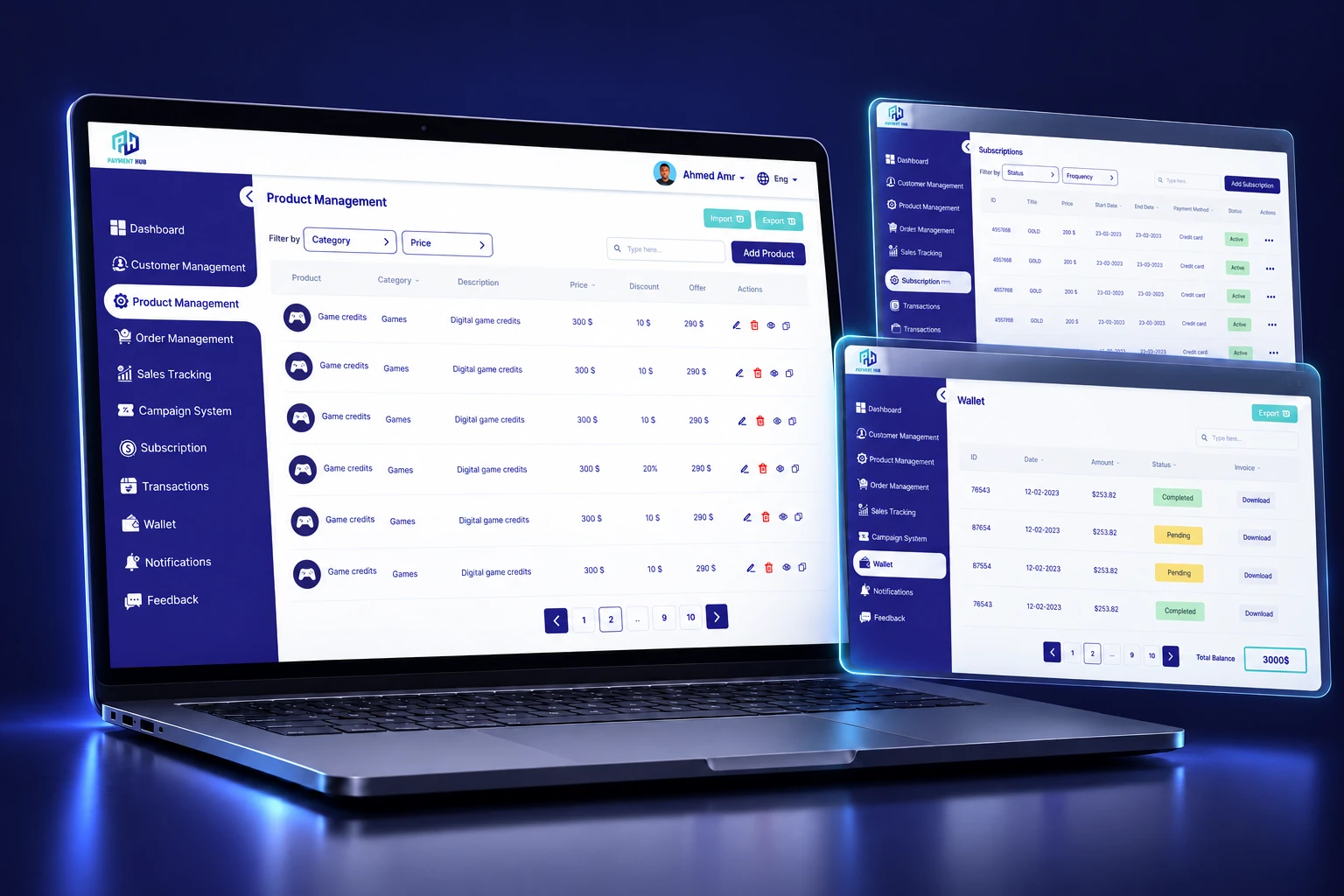
3D merchant portal laptop with product management, subscription and wallet panels
PAYMENT HUB / MERCHANT PORTAL3D VISUALIZATION / SAMPLE DATA
MERCHANT PORTAL

01/ 06Product management

Feature index

MERCHANT PORTAL 01 / 06

Product management

A catalog your team can keep current.

Merchants can add, edit and manage the products or services they offer. Prices, product images and descriptions live in the merchant workspace, giving the team a practical place to maintain what customers can buy.

Build the offer
Create products or services and present them with the price, images and description a customer needs.
Maintain the catalog
Edit existing listings as the offer changes, with product management alongside the rest of the merchant operation.
WHY IT MATTERS

Keep the commercial offer organized and make everyday catalog changes part of the merchant workflow.

Feature index
Product management3D VISUALIZATION / SAMPLE DATA

MERCHANT PORTAL 02 / 06

Customer management

Customer relationships with purchase context.

The merchant portal helps teams keep track of their customers and see who has bought their products. Merchants can also respond to customer feedback, connecting the customer relationship with the activity behind it.

Know the customer
View customer records and understand which customers have purchased from the business.
Keep the conversation connected
Reply to feedback from customers who have interacted with the merchant’s products or services.
WHY IT MATTERS

Give post-purchase conversations the customer and purchase context they need.

Feature index
Customer management3D VISUALIZATION / SAMPLE DATA

MERCHANT PORTAL 03 / 06

Sales & revenue tracking

See how the business is performing.

Merchants can follow the money their products generate and review the number of products sold. Sales and revenue visibility help the team connect day-to-day selling activity with the financial picture of the business.

Follow sales activity
Track sold products to understand the volume of business moving through the platform.
Review revenue
See generated revenue and use the reporting view to follow commercial performance.
WHY IT MATTERS

Give business reviews a clearer starting point with sales activity and revenue in view.

Feature index
Sales & revenue tracking3D VISUALIZATION / SAMPLE DATA

MERCHANT PORTAL 04 / 06

Transaction management

Follow the order behind each payment.

Merchants can view, process and manage orders and transactions, then track their status. The transaction view brings the reference, amount, payment method and status into the same working context as the merchant’s sales activity.

Manage the work
View and process orders, manage their associated transactions and follow the status of each one.
Find the detail
Use transaction references, amounts and payment methods to locate the activity that needs a closer look.
WHY IT MATTERS

Help the team move from a customer’s order question to the relevant payment and transaction detail.

Feature index
Transaction management3D VISUALIZATION / SAMPLE DATA

MERCHANT PORTAL 05 / 06

Subscriptions

A workspace for recurring offers.

Merchants can offer products on a subscription basis and manage those subscriptions in the portal. Payment tracking and configurable billing cycles support a recurring offer alongside the business’s other products and transactions.

Shape the billing cycle
Configure billing cycles for the products the merchant offers as subscriptions.
Follow recurring payments
Manage subscriptions and track their payments from the merchant workspace.
WHY IT MATTERS

Give recurring customer relationships a visible place in the daily commercial operation.

Feature index
Subscriptions3D VISUALIZATION / SAMPLE DATA

MERCHANT PORTAL 06 / 06

Merchant wallet

Balance and payout visibility after the sale.

The merchant wallet shows the balance and provides visibility into payouts and transactions. Teams can follow wallet activity alongside the sales operation, with pending and completed entries clearly distinguishable.

See the balance
Review the wallet balance as part of the merchant’s financial view.
Follow the activity
View payouts and track wallet transactions, including the status of the entries shown.
WHY IT MATTERS

Keep the conversation about money connected to visible wallet activity and payout information.

Feature index
Merchant wallet3D VISUALIZATION / SAMPLE DATA

PORTAL 02 / 03

End user portal.

A better journey around every purchase.

Give customers a connected place to discover products, pay, manage their account and get help after the purchase.
Explore six features
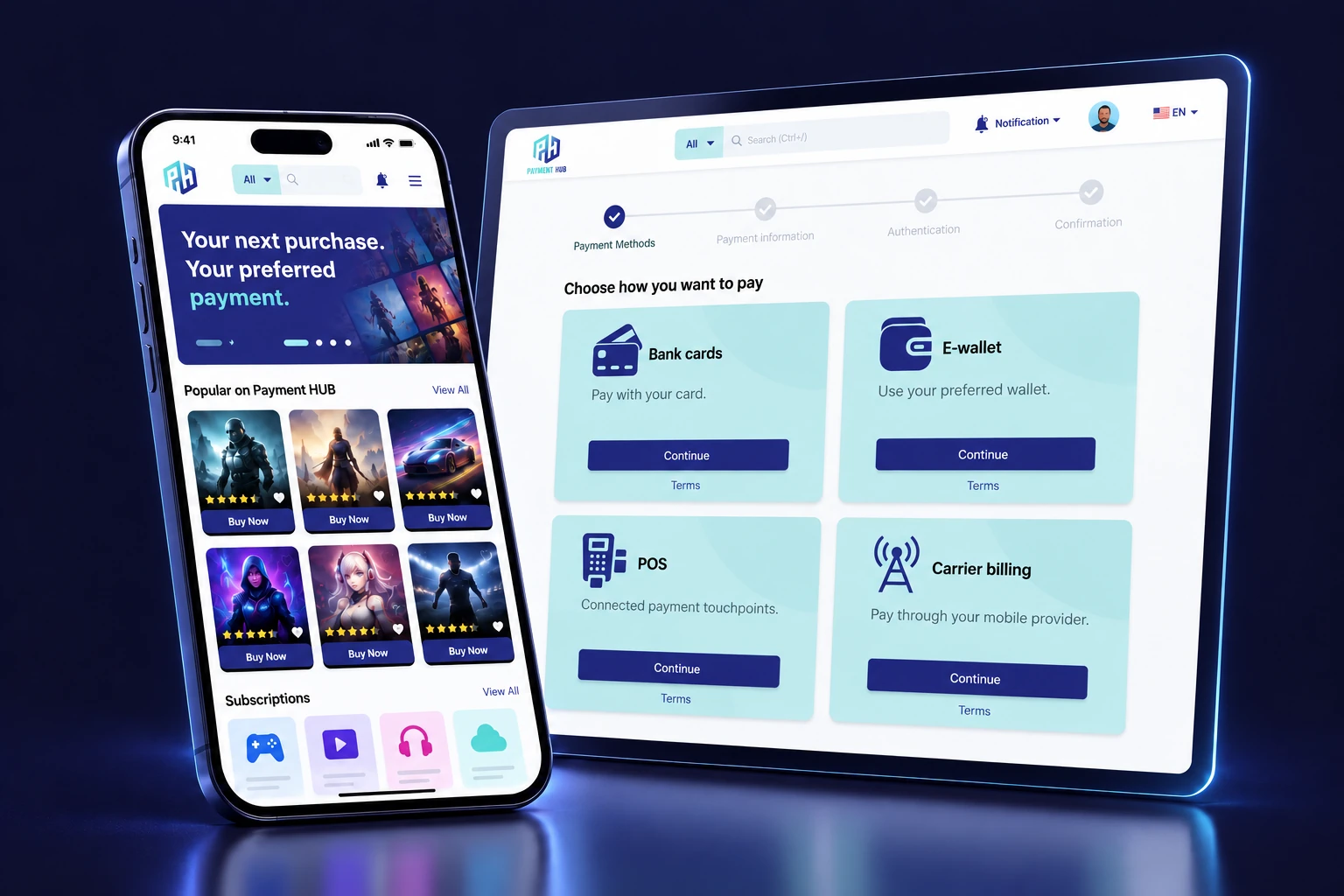
3D smartphone storefront beside a Payment Hub checkout panel
PAYMENT HUB / END USER PORTAL3D VISUALIZATION / SAMPLE DATA
END USER PORTAL

01/ 06Product discovery

Feature index

END USER PORTAL 01 / 06

Product discovery

Help customers find an offer that fits.

Customers can search for products, browse categories and filter results in the storefront. Product details give them more context before they make a purchase, bringing discovery and the payment journey into a connected customer experience.

Explore the catalog
Search for products, move through categories and narrow the available results with filters.
Understand the offer
Open product details and review the information presented before choosing what to buy.
WHY IT MATTERS

Give customers a clearer path from an initial interest to a specific product.

Feature index
Product discovery3D VISUALIZATION / SAMPLE DATA

END USER PORTAL 02 / 06

Payments & transaction history

Payment choice now. Purchase details later.

Customers can choose from the payment methods available for their purchase, then return to its transaction details. The customer portal brings the product, purchase date, amount paid, invoice and payment status into a record they can revisit.

Choose how to pay
Offer supported bank card, wallet, POS or carrier billing options according to the market and integration scope.
Keep the purchase visible
Let customers review the product, purchase date, paid amount, invoice and transaction status after checkout.
WHY IT MATTERS

Make the payment decision and the after-purchase record part of the same customer journey.

Feature index
Payments & transaction history3D VISUALIZATION / SAMPLE DATA

END USER PORTAL 03 / 06

Profile management

Account details customers can manage themselves.

The customer portal lets people update their personal and account information. Customers can maintain their name, gender, date of birth and phone number, as well as their email address and password, from the profile area.

Keep personal information current
Edit profile details such as name, gender, date of birth and telephone number.
Manage account details
Update the email address and password associated with the customer account.
WHY IT MATTERS

Give routine account updates a clear self-service destination within the customer experience.

Feature index
Profile management3D VISUALIZATION / SAMPLE DATA

END USER PORTAL 04 / 06

Ratings & reviews

A place for feedback after the purchase.

Customers can rate products and write about their experience after buying. They can also give feedback on the merchants they have interacted with, keeping the customer’s voice visible in the commerce experience.

Rate a product
Use a rating scale to express the customer’s assessment of a purchased product.
Describe the experience
Write a review and share feedback about products and the merchant interaction.
WHY IT MATTERS

Create a visible channel for purchase feedback that future customer and merchant conversations can refer to.

Feature index
Ratings & reviews3D VISUALIZATION / SAMPLE DATA

END USER PORTAL 05 / 06

Wishlist

Keep today’s interest within reach.

Customers can save products they are interested in when they are not ready to buy. The wishlist keeps those products accessible in the account, and customers can add or remove items whenever their plans change.

Save for later
Add an interesting product to the wishlist without completing a purchase at that moment.
Keep the list relevant
Return to saved products and remove items the customer no longer wants to keep.
WHY IT MATTERS

Help a customer return to an existing product interest without starting the search again.

Feature index
Wishlist3D VISUALIZATION / SAMPLE DATA

END USER PORTAL 06 / 06

Customer support

Help remains part of the experience.

Customer support representatives can assist with troubleshooting, order inquiries and other concerns. The customer portal provides a dedicated support area so customers have a place to ask for assistance after they interact with the platform.

Ask about an order
Bring purchase and order questions to the support team through the customer support area.
Resolve a concern
Get assistance with troubleshooting or other issues encountered during the customer experience.
WHY IT MATTERS

Give the customer a clear destination for help that stays connected to the commerce platform.

Feature index
Customer support3D VISUALIZATION / SAMPLE DATA

PORTAL 03 / 03

Admin portal.

The control behind a connected platform.

Bring users, merchants, transactions and content into a shared operational view, with the tools to monitor activity and review performance.

Explore six features
3D Payment Hub administration dashboard and payment methods panel
PAYMENT HUB / ADMIN PORTAL3D VISUALIZATION / SAMPLE DATA
ADMIN PORTAL

01/ 06User management & permissions

Feature index

ADMIN PORTAL 01 / 06

User management & permissions

Give each user the access their role needs.

Admins can create, search, view and manage user records. Roles carry specific permissions, and admins can change a user’s role later as responsibilities evolve, keeping access management within the platform’s operating controls.

Manage user records
Create users and search for or view the people using the platform.
Assign and update roles
Give users roles with specific permissions and change those roles when their responsibilities change.
WHY IT MATTERS

Support different teams on the same platform with access that reflects their responsibilities.

Feature index
User management & permissions3D VISUALIZATION / SAMPLE DATA

ADMIN PORTAL 02 / 06

Merchant management

Merchant relationships with operational context.

Admins can add, edit or remove merchants and control what those merchants can do on the platform. The merchant view brings business information together with earnings and merchant payment activity, including the ability described in the platform to send money to merchants.

Maintain merchant access
Add merchants, update their information, remove records when required and control their permitted activity.
Follow the financial relationship
Review what a merchant has earned and manage sending money to the merchant.
WHY IT MATTERS

Keep the merchant profile and the financial relationship in a common operating context.

Feature index
Merchant management3D VISUALIZATION / SAMPLE DATA

ADMIN PORTAL 03 / 06

Transaction oversight

Move from platform activity to the detail.

Admins can monitor transactions in real time and review activity by merchant, customer and available payment method. Transaction details connect the payment with its related product and the people or businesses involved.

Monitor the payment operation
Follow transaction activity across the platform and view breakdowns for merchants and users.
Investigate a transaction
Review the transaction reference, date, method, status and the related product, customer and merchant details.
WHY IT MATTERS

Help operational questions move from a platform-wide view to a specific payment record.

Feature index
Transaction oversight3D VISUALIZATION / SAMPLE DATA

ADMIN PORTAL 04 / 06

Fraud detection

Put suspicious activity in view.

Payment Hub analyzes transactions and flags suspicious behavior for attention. Admins can review payment activity in context, with transaction status and flags visible in the transaction interface, supporting investigation of potentially fraudulent activity.

Surface suspicious behavior
Use flagged payment activity to identify transactions that need further examination.
Review the context
Consider the merchant, payment method, status and transaction details when investigating an item.
WHY IT MATTERS

Give flagged activity a visible place in the operational review process, with the transaction context needed for investigation.

Feature index
Fraud detection3D VISUALIZATION / SAMPLE DATA

ADMIN PORTAL 05 / 06

Content management

Keep the platform’s content current.

Admins control the content that appears on the platform through its content management system. They can add, change or delete text, images and videos, giving the team a working place to maintain what customers see.

Manage the content types
Create or update text, image and video content that appears on the platform.
Maintain what is published
Change existing content or remove material that no longer belongs in the experience.
WHY IT MATTERS

Make content maintenance part of platform administration as products and customer information evolve.

Feature index
Content management3D VISUALIZATION / SAMPLE DATA

ADMIN PORTAL 06 / 06

Reports & analytics

A clearer view of platform performance.

Admins can review insights into how the platform is performing, including transaction volumes, generated revenue and user activity. Reporting connects operational oversight with a broader view of how people and merchants are using the platform.

Review the payment picture
Follow transaction counts and revenue generated through the platform.
Understand platform activity
Review user activity alongside financial information to inform the next operational discussion.
WHY IT MATTERS

Give management and operations a shared view to use when reviewing the platform’s performance.

Feature index
Reports & analytics3D VISUALIZATION / SAMPLE DATA

Different roles. A shared view of the payment journey.

CONNECTED BY PAYMENT HUB

04 / THE CUSTOMER JOURNEY

FROM DISCOVERY TO PAYMENT HISTORY.

A choice at checkout.
Clarity after the purchase.

Explore an illustrative journey from a digital product to its transaction record.

01 / DISCOVER

A product worth
coming back for.

Customers browse the catalog and view product details before they decide to buy.

paymenthub.ILLUSTRATIVE DEMO
DiscoverPaymentConfirmationRecord
DIGITAL ENTERTAINMENT

Arcade Pass

A sample digital product, used to demonstrate the purchase journey.

20.00 USDSample amount
Illustrative product journey. No payment is processed.

05 / AFTER THE PAYMENT

THE PAYMENT JOURNEY, IN 3D.

The customer pays.
Your team keeps track.

Follow the illustrative purchase into the merchant operation. These 3D views illustrate the payment information your team can follow.

THE SAME ILLUSTRATIVE PURCHASEArcade Pass PH-DEMO-001
20.00 USDSample order · No live sync
IN THE MERCHANT PORTAL

See the transaction
behind the sale.

The merchant transaction view brings the reference, amount, payment method and status into one table, with revenue visibility alongside it.
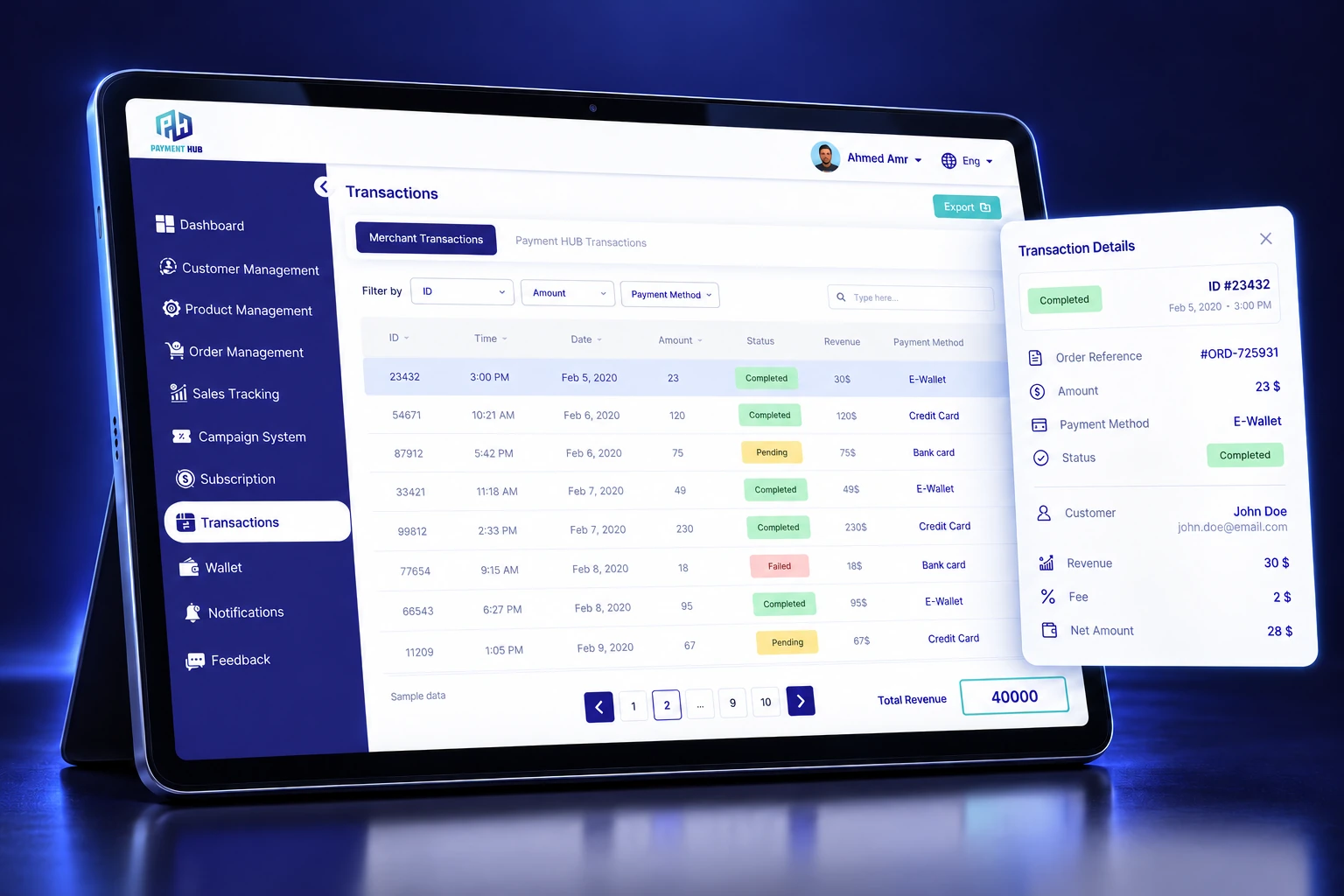
  1. 1Transaction status shows what needs attention.
  2. 2Revenue totals support the merchant’s sales view.
3D FEATURE MOCKUPMERCHANT TRANSACTIONS
3D merchant transaction management mockup
3D visualizations use sample interface data. The Arcade Pass purchase is an illustrative thread.
THE OPERATIONAL VALUE

Payment Hub consolidates reconciliation with payment partners. Transaction and wallet visibility give the merchant a shared place to follow the activity.

Matching rules, settlement timing and payout arrangements are part of the implementation discussion.

06 / WHERE WE CAN GO TOGETHER

A SHARED PLATFORM. DIFFERENT OPPORTUNITIES.

A payment setup
that fits your business.

Start with your operating model, then define the payment connection and portal workflows you need.

FOR MERCHANTS

More payment choice.
A clearer view of the business.

Bring product management, transactions and subscriptions into a connected merchant workspace.

LET’S EXPLORE
  • Your products and current payment channels
  • How your team tracks sales and reconciles today
  • The merchant workflows to include in a pilot
Coverage, commercial terms and implementation scope are agreed during discovery.

A PROPOSED PATH FORWARD

Start focused.
Build from what works.

  1. 01
    Map the fit

    Your business, markets and payment needs.

  2. 02
    Define a pilot

    Agree the channels, workflows and responsibilities.

  3. 03
    Review the results

    Validate the operation before expanding the scope.

YOUR NEXT CONNECTION STARTS HERE.

Let’s put your
payments in motion.

Define your payment needs and the pilot you want to explore.
Take a clear brief into the next discussion.

Download the brief, then share it with your existing Payment Hub contact.
3D FEATURE MOCKUP

Merchant portal

3D Payment Hub product management mockup

3D product visualizations based on Payment Hub’s reference interfaces. Sample data.

LET’S FIND THE FIT

Your Payment Hub
discussion brief.

Choose your priorities and download the outline. Share it with your existing Payment Hub contact to arrange the next discussion.

Payment channels to explore

This creates a file on your device. Nothing is submitted or sent.