See the commitments ready to fulfill, the stock eligible to load and the differences still open at closure. Coordinate the teams responsible for each decision.
Simulated operating day with sample data. Live tracking and automated actions require implementation.
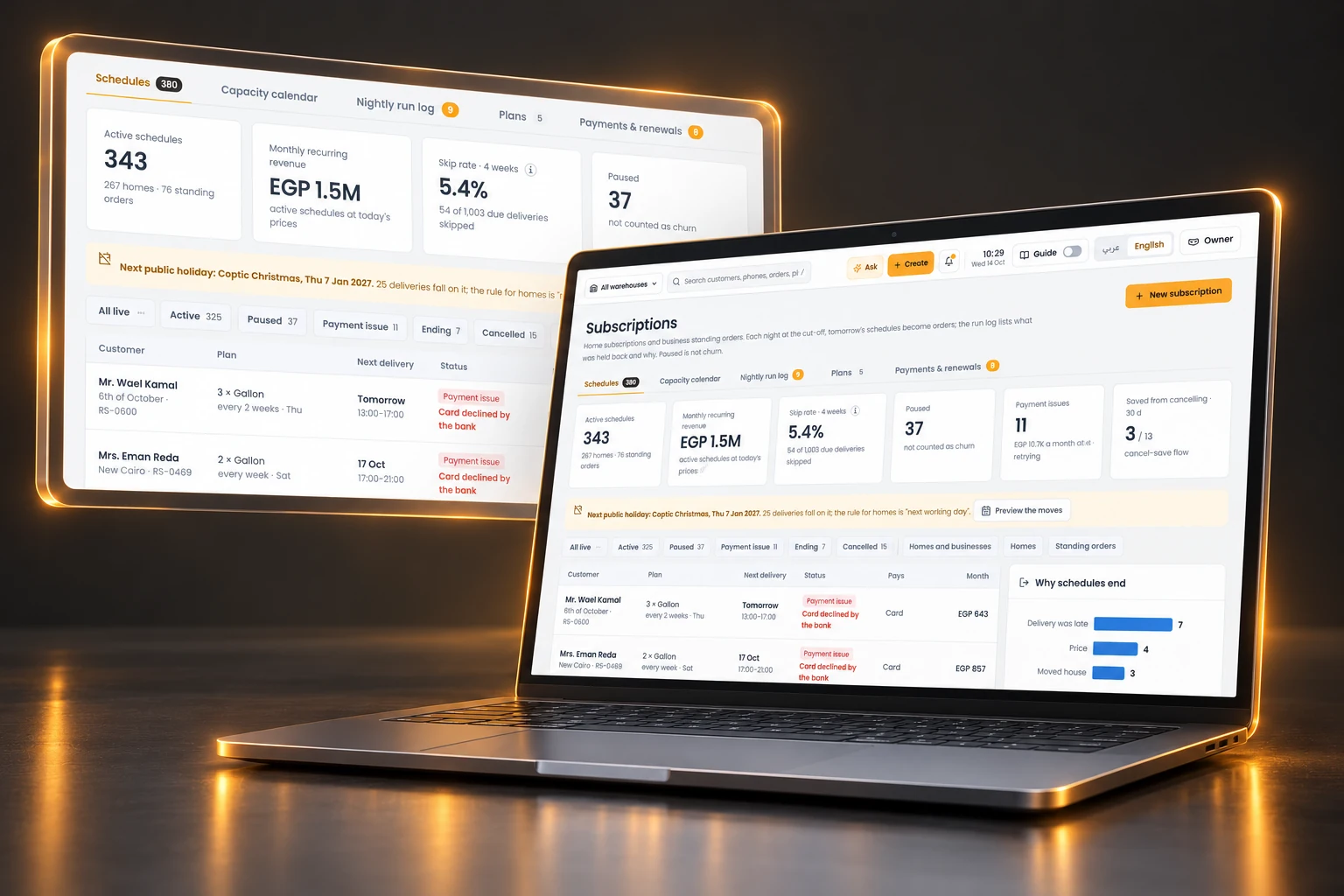
See tomorrow’s standing orders and the schedules that need attention.
Keep repeat deliveries attached to the customer, product quantities and delivery days. A capacity calendar and run log make the planned workload easier to review before the warehouse starts.
Schedules with context
Review the next delivery, plan and status. Pauses and payment issues have distinct states.
A visible release check
Inspect orders created from schedules and the reasons a schedule was held back in the sample run log.
Dispatch can work from known commitments and investigate exceptions before a missed delivery becomes a customer call.
Follow what a supplier quoted, what was confirmed and what was ordered.
Give the back office a working view of supplier and freight offers. Keep the related deal, destination, validity and status beside the commercial document instead of chasing a separate email trail.
Attention before commitment
Surface offers without a linked deal, approaching expiry or carrying a compliance flag.
A traceable buying record
Review offer lines and the permitted next transitions. Sensitive economics follow the reader’s access.
Procurement can resolve missing context before a buying commitment moves downstream.
Know what is due at the dock and how it becomes available stock.
Bring expected plant deliveries, warehouse transfers and replenishment requests into the receiving conversation. The handoff includes shipment references, lots, quantities and a receiving checklist.
Receiving with evidence
Inspect incoming pallets and post the receipt after the check. Plant requests retain the approval and planning handoff.
Movement between sites
Follow a transfer through draft, approval, shipment and receipt. Track returnable empties sent back to the plant where relevant.
Storekeepers can prepare for arrivals and resolve receiving differences before stock reaches the shelf.
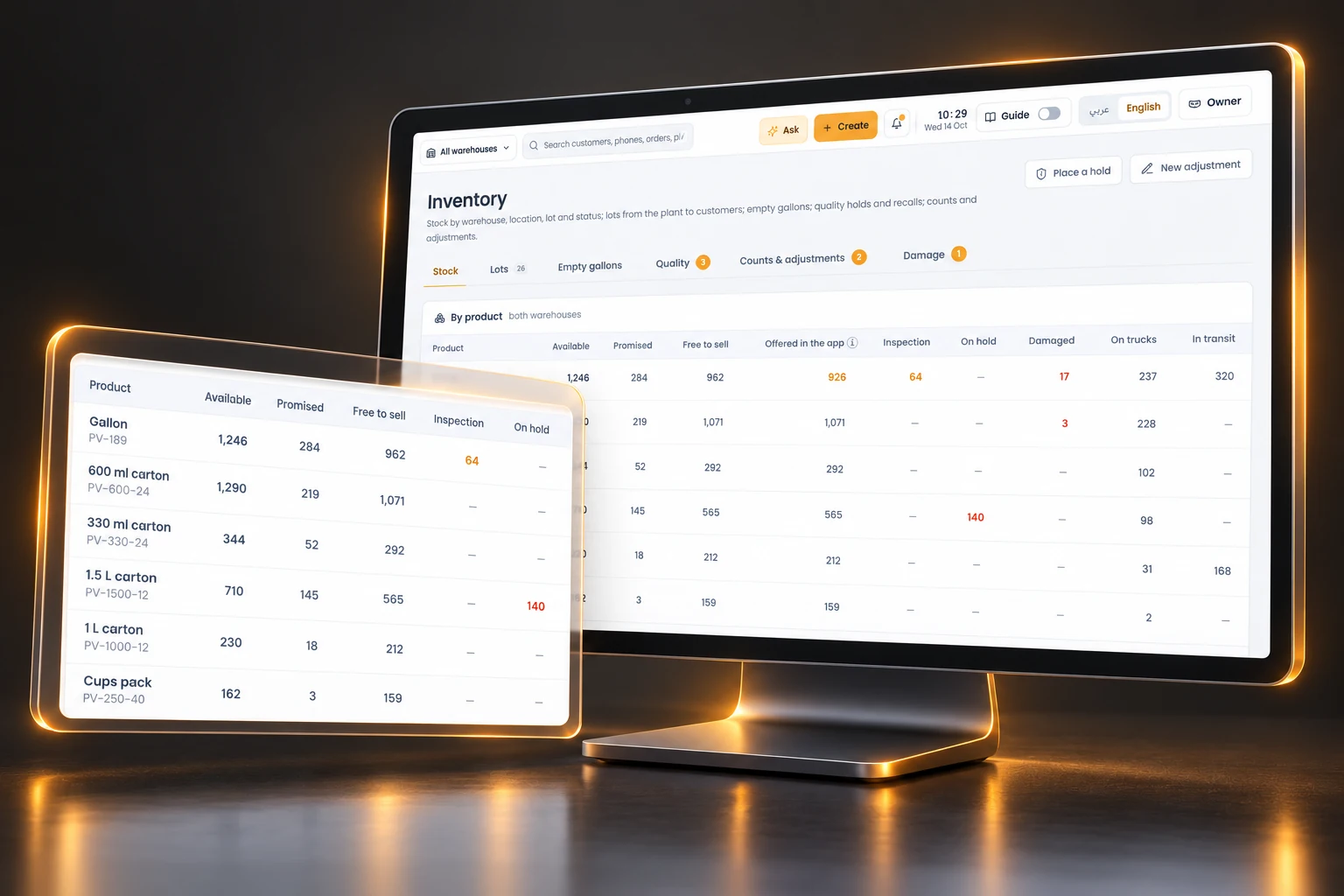
Separate stock on hand from stock that can be promised and loaded.
Review inventory by warehouse, location, lot and condition. Product totals expose available, promised, free-to-sell, inspection and held quantities so the team can explain an availability constraint.
Lot and quality control
Trace a lot from plant to warehouse and customer. A quality hold blocks affected stock in the demonstrated workflow.
Controlled correction
Counts and adjustments retain a reason and approval. Quality release has its own authority.
Sales, warehouse and quality teams can discuss the same stock constraint before making the next commitment.
Inventory & qualityIllustrative UI and sample data
02 Production & quality
Output stays linked to release and dispatch
A finished run still needs the lab’s release before it can be loaded.
Give the plant planner, lab and shipping supervisor views of the same operating day. Review line runs, plant stock, shipment demand and the warehouse requests waiting for a plan.
Run and release visibility
Plan by line, product, day, shift and quantity. Distinguish running, lab, released and held lots.
Plant-to-dock coordination
Review dispatch schedules, stock cover and loading checks. Held lots cannot pass the demonstrated dock scan.
The plant and warehouse can see whether planned output will be ready for the shipment it is meant to fill.
Production & qualityIllustrative UI and sample data
03 Picking & scanner
The right lot reaches the right load
Turn the trip into a pick list that the warehouse can check.
Coordinate picking waves, loading bays and route load sheets. Each line carries the product, lot, location and quantity. The scanner workspace illustrates the scan-by-scan picker experience.
Checks at the point of work
Show shortages, blocked lots and replacement picks. The sample flow checks lot eligibility and remaining shelf life.
A signed load handoff
Review loading in reverse stop order, the driver’s signature and the returning truck’s stock check-in.
The loading conversation can focus on a specific missing or blocked line, with a clear handoff to the driver.
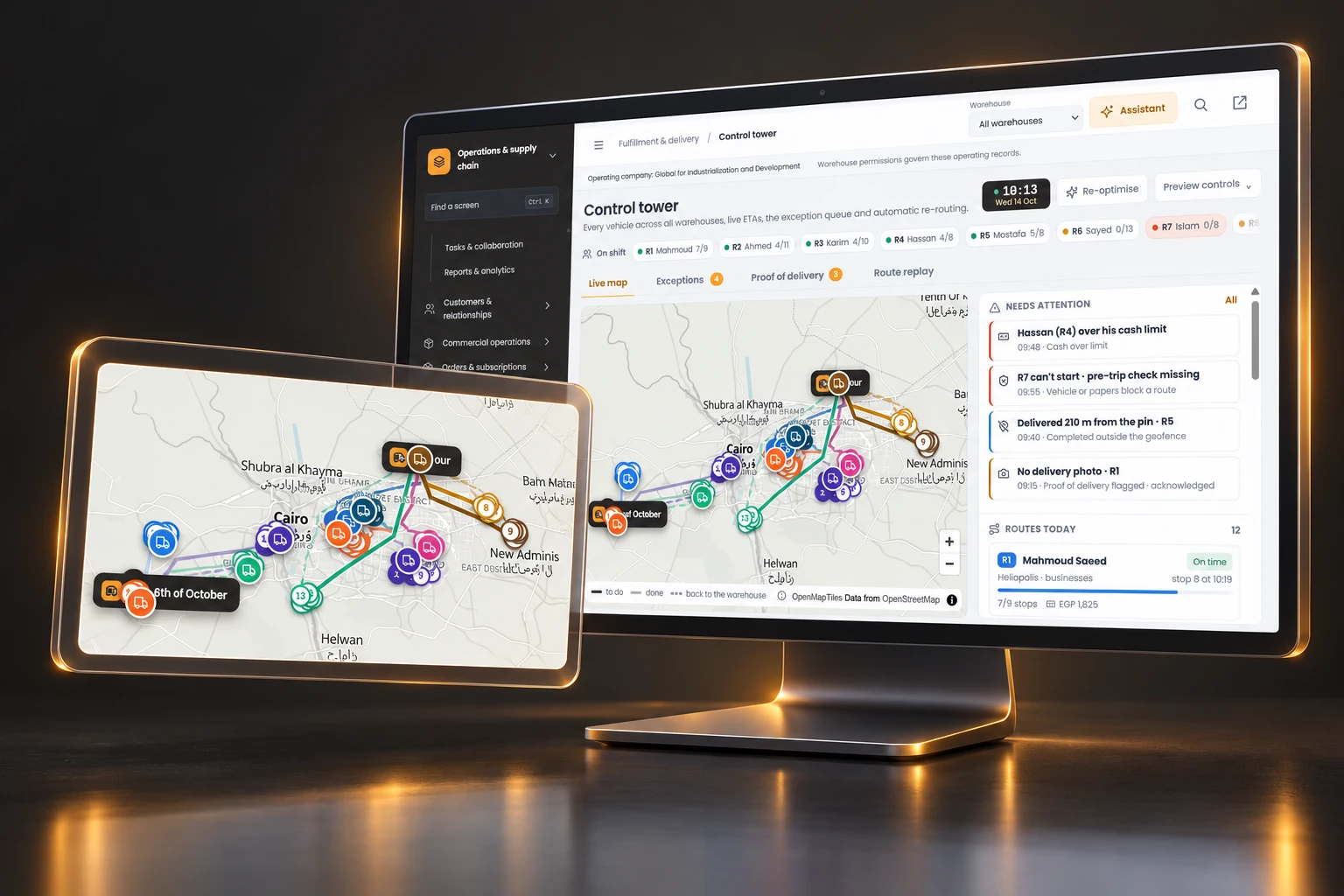
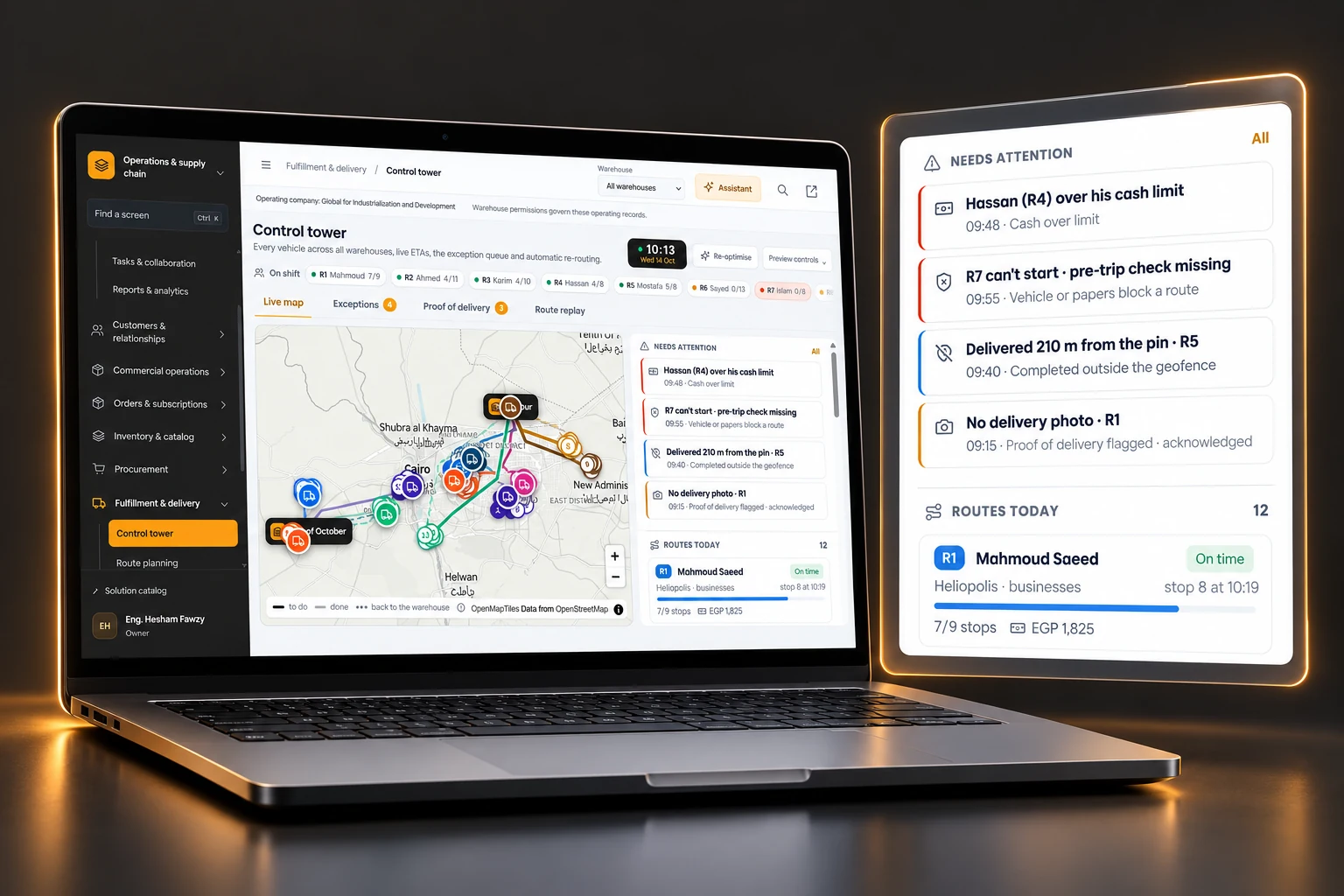
See the route picture, then focus on the stop that needs a decision.
Bring route progress, arrival estimates and attention items into one dispatcher view. The screens show a simulated operating day. Live GPS, notifications and automated actions require implementation.
Attention with context
Review the affected route, exception owner and timer. Inspect missing proof, a skipped stop or a readiness issue.
A reviewable response
Preview a re-plan and its arrival-time changes before applying it. Discuss authority and escalation rules for each action.
The operations manager can work through disruptions with the relevant route evidence close at hand.
Bring the load, returns and cash handover back to one truck record.
Review what left the warehouse against what was delivered, returned or damaged. Compare returnables and counted cash with the expected amounts, then work the differences.
A simple example shows the decisions across teams. The quantities are invented for this illustration and do not represent business results.
Account team / Dispatcher
A standing order is due tomorrow
A business customer expects 24 cartons. The team checks the recurring schedule, delivery slot and any run-log exception before treating the demand as ready for fulfillment.
Decision to carry forward
Confirm which commitments are ready for the operating plan.
Recurring orders / illustrative UI and sample data
BeforeA customer commitment, a held lot and a driver load can sit in separate conversations.
With these controlsThe team chooses eligible stock, signs for the load and accounts for delivery, damage and cash in the trip’s closure.
This illustrative walkthrough explains handoffs. It does not run transactions or assert that a newly published plan creates pick waves in the prototype.
05 / Fit & rollout
An operating model to validate
Start where the handoff costs you control
Use one operation to test the records, authority and exceptions that matter. Add scope after the team can run that day reliably.
Connect availability to the delivery promise
For a distributor handling repeat orders, warehouse picking and its own delivery fleet. Begin with one warehouse, one recurring customer group and a complete truck settlement.
Validate: product units, shelf-life rules, returnables and cash collection practices.
01
Map the control gates
Agree record ownership, permitted actions and when a person must approve a change.
02
Pilot one operating day
Use a real site’s order types, products and exception cases in a controlled pilot.
03
Validate the physical handoff
Check scanners, connectivity, receiving evidence, signatures and cash counts with the team.
04
Expand with evidence
Review completion, missing evidence and unresolved differences before adding sites or automation.
Agree success measures from your baseline. No savings, deployment timeline or integration availability is assumed here.
06 / Questions that shape the scope
Clear expectations before a pilot
The right operating fit matters
How broad is the solution?+
It covers work before and after delivery routes: recurring commitments, supplier offers, receiving, lot and quality status, plant runs, picking and truck settlement. Select the modules and control gates that match your operation.
Can this work with our ERP or WMS?+
Discovery maps system ownership, data quality and the interfaces required. The presentation demonstrates workflows. It does not claim completed backend integrations or a statutory accounting replacement.
What does the manufacturing scope include?+
The current screens show run planning, lab release, plant stock and dispatch. BOM/MRP, machine control, OEE and industry validation need separate requirements and assessment.
Are tracking and automation live?+
The current demo uses a simulated operating day. Live GPS, notifications, scanner behavior and automated actions require integration, device validation and agreed authority. A person controls the demonstrated route-publishing step.
Do the product examples fit other industries?+
The sample distribution UI uses beverage products, lots, shelf life and returnable containers. Supplier offers include machinery and freight examples. Discovery maps those records to your product units and processes rather than assuming every workflow already fits.
How are sensitive actions controlled?+
The source workflows include role and warehouse scope, quality-release authority, approved stock adjustments and shortage approvals. Validate the permissions and audit evidence with your actual operating roles during the pilot.
07 / A focused next step
Bring one difficult operating day
Choose a site, a recurring commitment and an exception that crosses teams. Prepare a brief for the workflows and controls you want to validate.
Download or copy a local brief. Nothing is submitted or sent.