Knowledge &
Workflow.

FOR SHARED SERVICES & TRANSFORMATION TEAMS

From scattered
knowledge to
accountable action.

Give people the context to decide.
Give workflows the boundaries to act.
Keep the evidence to explain what happened.
Connected knowledgeGoverned actionTraceable execution
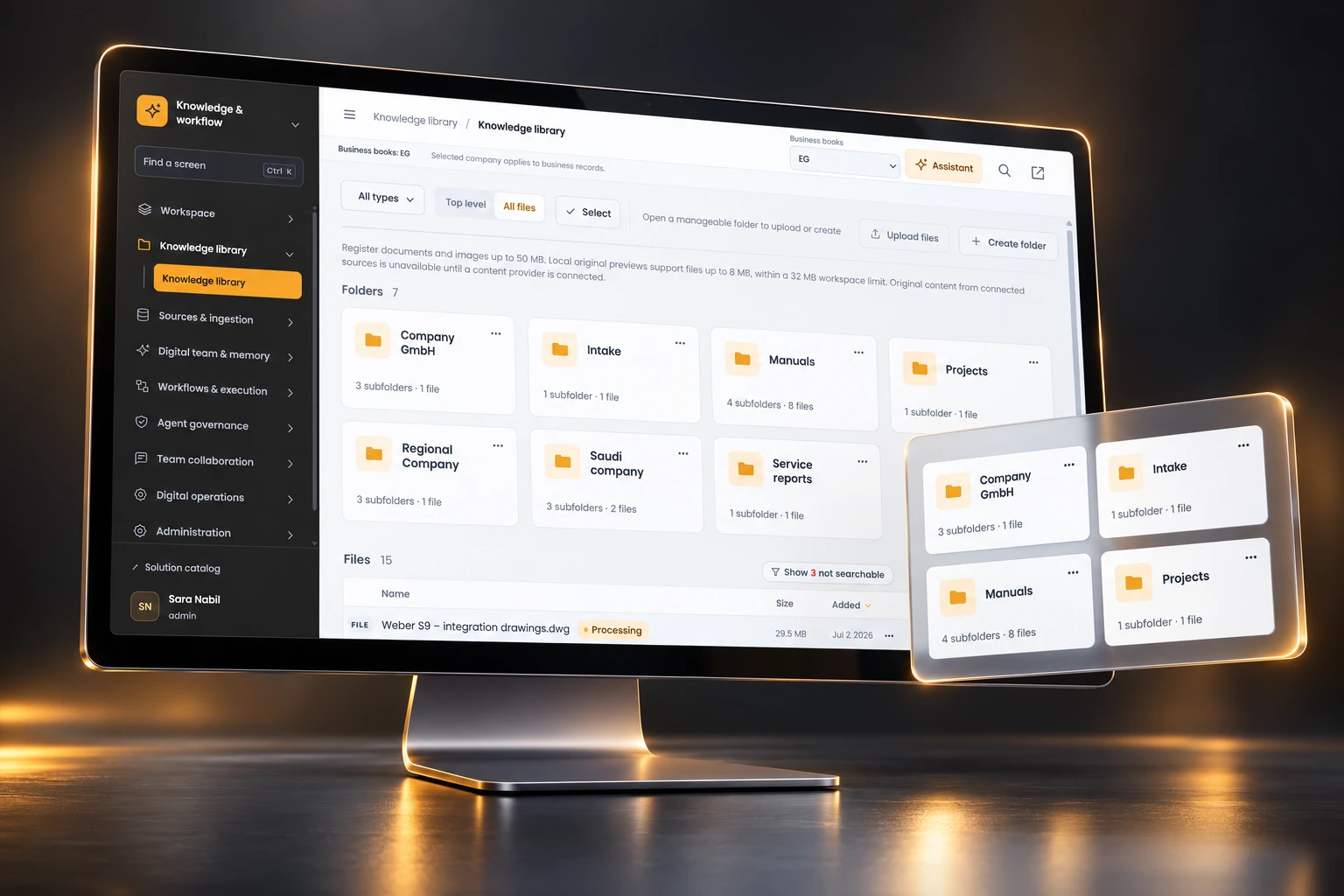
Generated 3D desktop visualization of the Knowledge & Workflow sample library.
Knowledge library · Sample UI & data · Generated 3D visualization

THE EVERYDAY FRICTION

Your knowledge exists.
Can your team
put it to work?

For COOs and shared-service leaders, the problem is often the gap between finding information and completing a controlled process.

01

“Which version should I trust?”

Documents sit across folders and inboxes. Ownership, access and ingestion state are hard to see.

02

“Where did that answer come from?”

Repeated questions consume expert time. A response without a source creates another round of checking.

03

“Why did the automation do that?”

A handoff loses context. Teams need the steps, the approver and the process version behind an outcome.

BEFORE

Search → ask around → copy context → chase an update

WITH A CONNECTED WORKSPACE

Find the source → inspect the answer → route the work → review the run

ONE CONNECTED OPERATING LOOP

Context comes in.
Responsibility stays clear.

One solution for teams that need usable knowledge and repeatable, explainable work. Each stage has a practical question to answer.

  1. 01

    Curate

    What can the team find and read?

    Library · sources · ingestion
  2. 02

    Understand

    What evidence supports this answer?

    Cited Assistant · confirmed memory
  3. 03

    Route

    What happens next, and who approves?

    Workflow canvas · policies · handoffs
  4. 04

    Review

    What happened in this particular run?

    Saved revisions · evaluation · history

The screens illustrate configured workflows. Source connections, models, action tools and deployment controls are agreed for the implementation.

THE PRODUCT TOUR

Nine capabilities.
One practical story.

Start with usable knowledge.
Connect it to repeatable work.
Keep people and evidence in the loop.

CHAPTER 01 / THREE CONNECTED CAPABILITIES

Make knowledge usable

Give people a dependable place to start.

Bring documents into a permission-aware library, watch the content pipeline, and let people inspect the evidence behind an answer.

Explore the chapter
Generated chapter visualization: Make knowledge usable
Sample interface · illustrated from the approved v10 screens
  1. Knowledge library
  2. Sources & ingestion
  3. Cited Assistant
01 / Make knowledge usable

01 / 09Knowledge library

01 / 01 Knowledge library

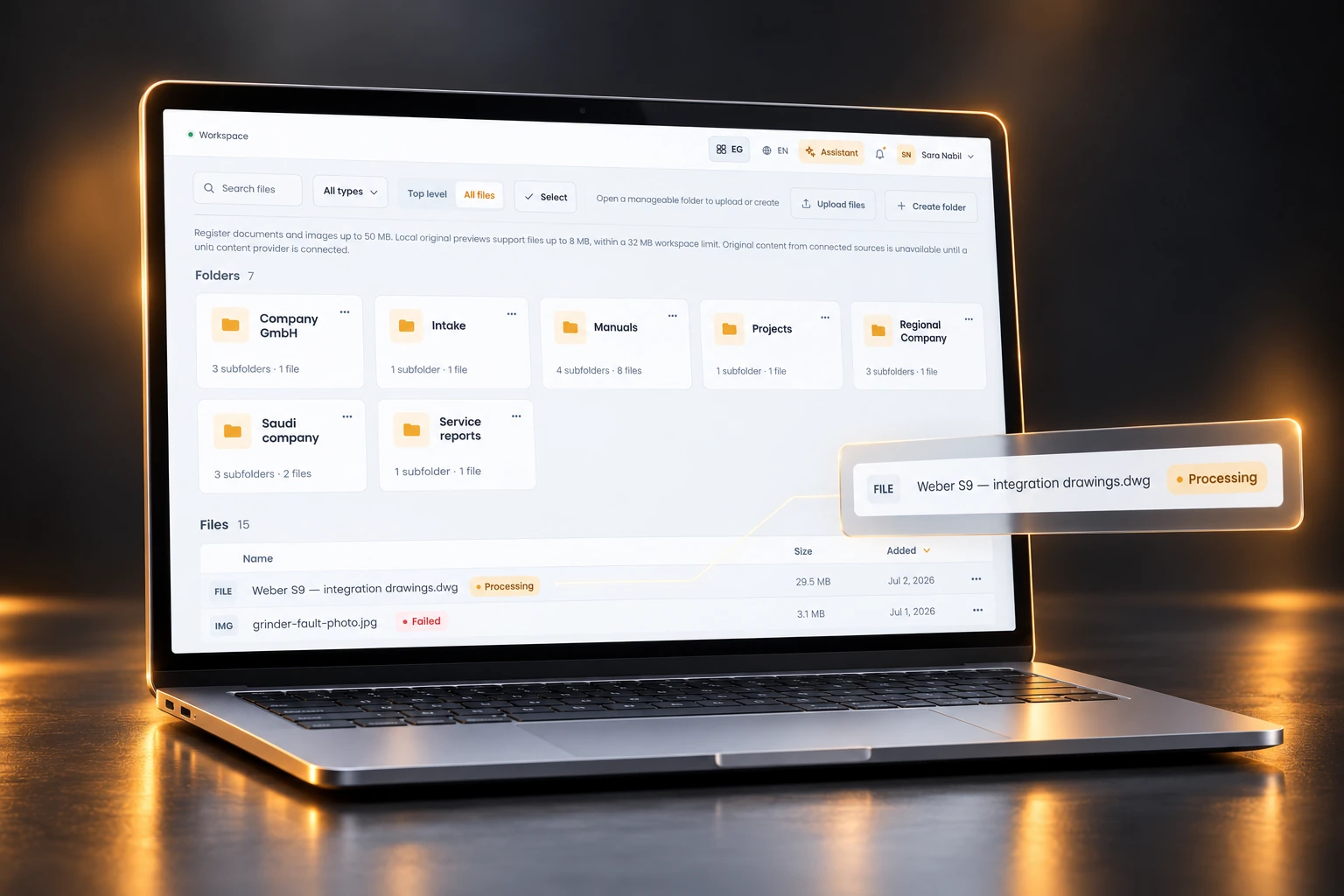
A library people can navigate

Replace the hunt for the right file with a shared, structured starting point.

Browse folders, search uploaded documents and open a file in its original context. Folder access gives knowledge owners a practical way to decide who can read and manage each area.

Folders with ownership
Organize manuals, projects and company material; manage folder access where permitted.
Documents with context
Open a document record, its origin and a page-anchored preview; see when a file is still processing.
THE OPERATIONAL DIFFERENCE

A team can find the source, identify its owner and resolve a content issue before relying on an answer.

Knowledge librarySample UI & data · generated 3D visualization

01 / 02 Sources & ingestion

A visible path from source to search

Know what is connected, what is selected and what needs attention.

The source and ingestion workspaces show how a configured implementation can select content, inspect processing and assign source repair. Connection status and searchable content are separate checks.

PROTOTYPE SCOPECurrent prototype: Sources registers sample metadata only. Message content, files and attachments are not downloaded or indexed. Ingestion transitions are simulated; storage and extraction services require implementation.

A deliberate content boundary
Agree which source folders and mailboxes may feed knowledge, with their owners and access limits.
A repairable pipeline
Use the illustrated processing states and retry controls to define operational ownership and exception handling.
THE OPERATIONAL DIFFERENCE

Knowledge operations gets a clear place to own source quality and pipeline exceptions when content services are connected.

Sources & ingestionSample UI & data · generated 3D visualization

01 / 03 Cited Assistant

Answers with a way back to evidence

Move from a plausible answer to a source someone can inspect.

Use the Assistant to ask a question against available knowledge. Citation links bring the supporting document into the conversation, so a colleague can check the underlying material before deciding what to do.

Visible source references
Follow the cited material and compare the response with the source context.
A reviewable next step
Keep consequential decisions with the responsible person. Model, provider and retrieval setup are implementation choices.
THE OPERATIONAL DIFFERENCE

The conversation becomes a useful starting point for judgment, with an evidence trail that people can challenge.

Cited AssistantSample UI & data · generated 3D visualization

CHAPTER 02 / THREE CONNECTED CAPABILITIES

Turn context into action

Make repeatable work explicit.

Capture confirmed learning, design the steps, and inspect what happened in a particular run. Context and execution stay connected without hiding the decision path.

Explore the chapter
Generated chapter visualization: Turn context into action
Sample interface · illustrated from the approved v10 screens
  1. Reusable agent memory
  2. Workflow builder
  3. Versioned execution history
02 / Turn context into action

04 / 09Reusable agent memory

02 / 01 Reusable agent memory

Learning that has an owner

Keep useful corrections available without silently turning every observation into a rule.

Memory separates what happened, what is true and what works. Agent-written memories wait for a person to confirm them, while scope and evidence help keep one client's lesson from becoming everybody's instruction.

Three distinct layers
Review episodes, facts and procedures with their origin, status and supporting evidence.
Confirmation and scope
Confirm proposed learning and define where it applies, including a specific customer or document type.
THE OPERATIONAL DIFFERENCE

Teams can reuse an accepted correction and revisit why it was accepted when circumstances change.

Reusable agent memorySample UI & data · generated 3D visualization

02 / 02 Workflow builder

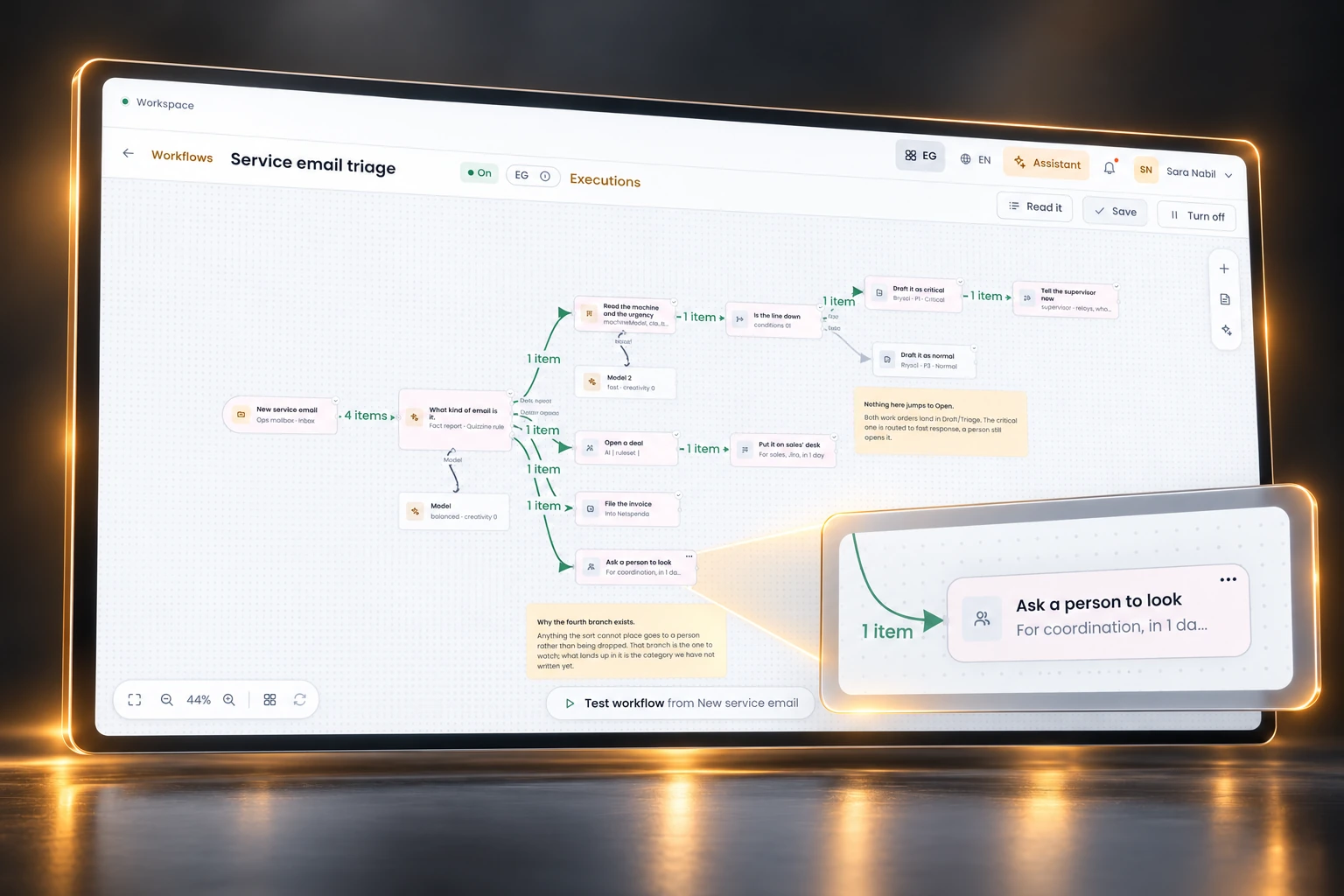
A workflow you can explain

Put triggers, branches and AI steps on a canvas that a process owner can review.

Build a trigger-to-outcome flow with If, Switch and AI sort branches. Configure an AI step's model, readable folders and permitted lookups, then test sample items and inspect the item count on each wire.

A readable decision path
Use the canvas or an ordered sentence view to understand the same workflow, including branches that go nowhere.
Test before activation
Run sample items. The screen refuses activation while required parts remain unfinished and explains why.
THE OPERATIONAL DIFFERENCE

Operations and IT can discuss a concrete process together: what arrives, how it is routed and where a person needs to intervene.

Workflow builderSample UI & data · generated 3D visualization

02 / 03 Versioned execution history

Every run has a story

See the steps that ran, the branches that did not and the workflow version behind the result.

Scan the shape of a run before opening its detail. Inspect what each step received, produced and said, and distinguish a branch that was not taken from a step that was never connected.

Step-level evidence
Read inputs, outputs and explanations, including why items did not continue down a branch.
A version to investigate
Use the recorded run and workflow version as the starting point for review; compare process changes with the execution evidence.
THE OPERATIONAL DIFFERENCE

When an outcome is questioned, the team has a specific run to investigate and a process version to discuss.

Versioned execution historySample UI & data · generated 3D visualization

CHAPTER 03 / THREE CONNECTED CAPABILITIES

Keep control and evidence

Make the boundary as clear as the capability.

Decide which actions need approval, review performance by job, and give privacy and operational owners a shared view of the data and decisions.

Explore the chapter
Generated chapter visualization: Keep control and evidence
Sample interface · illustrated from the approved v10 screens
  1. Permissions & approvals
  2. Evaluation & review
  3. Privacy & collaboration
03 / Keep control and evidence

07 / 09Permissions & approvals

03 / 01 Permissions & approvals

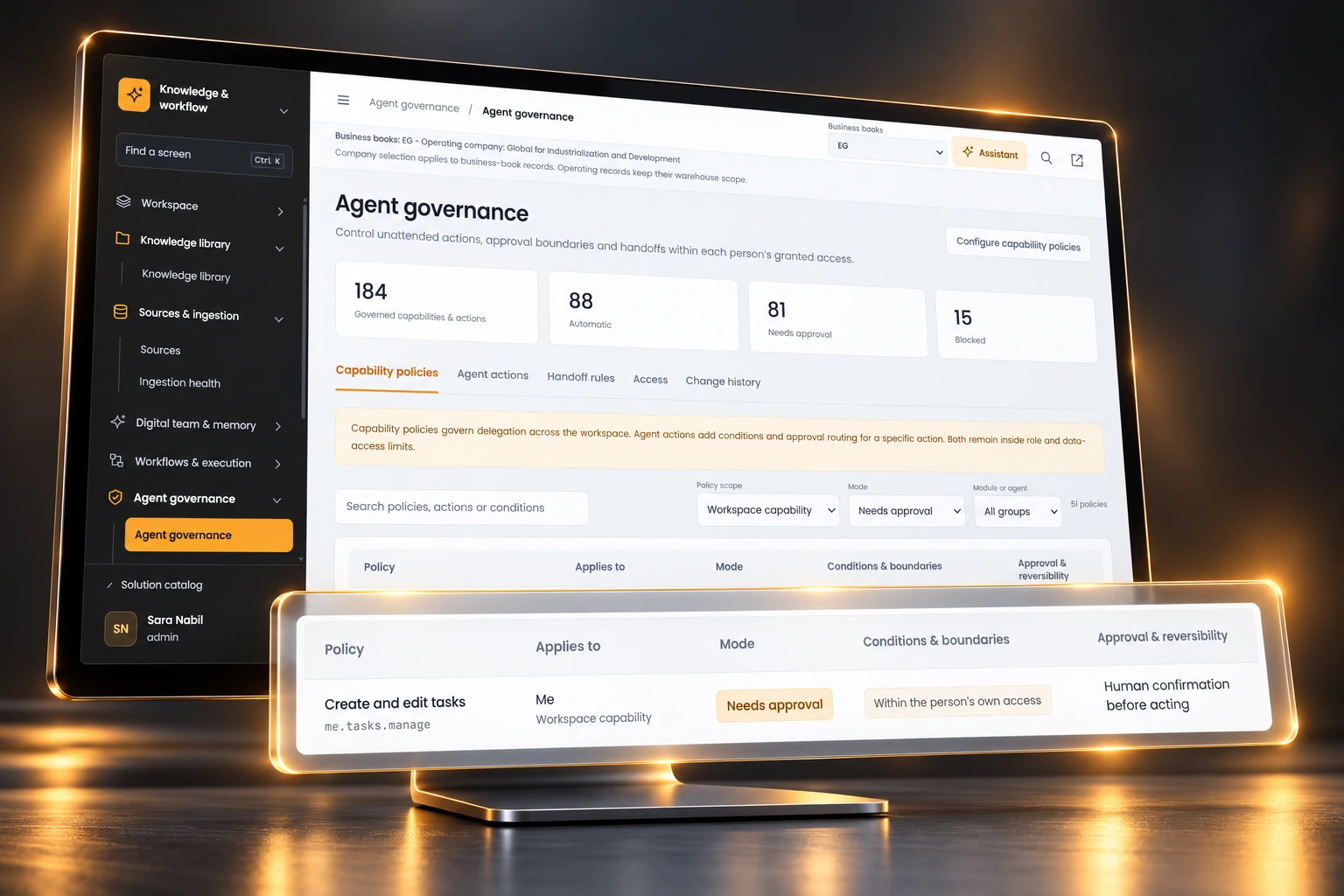
Approval is part of the design

Define what may happen automatically, what needs a person and what is blocked.

Capability policies and agent-action rules make delegation boundaries visible. Action conditions, approval routing and reversibility sit alongside the policy; both remain inside role and data-access limits.

Explicit action modes
Review Automatic, Needs approval and Blocked modes with the applicable scope and conditions.
Accountable handoffs
Inspect the approver, timeout or escalation settings and change history before widening delegation.
THE OPERATIONAL DIFFERENCE

A process owner can discuss the exact approval boundary with IT, then check whether configuration matches that decision.

Permissions & approvalsSample UI & data · generated 3D visualization

03 / 02 Evaluation & review

Evaluate the job, then set the boundary

Treat assistant quality as something to inspect and improve for a particular task.

The evaluation workspace brings job-level outcomes, recurring errors and human checking into view. Use the sample review patterns to agree how real pilot results will be judged before changing an approval threshold.

Look beyond a single answer
Review task-level results and recurring failure patterns rather than treating a dashboard score as universal accuracy.
Keep human review meaningful
Inspect reviewer checking and use representative cases to agree when a workflow should stop for confirmation.
THE OPERATIONAL DIFFERENCE

The pilot can produce evidence for a decision about scope and oversight. The sample screen is not a measured claim about live AI accuracy.

Evaluation & reviewSample UI & data · generated 3D visualization

03 / 03 Privacy & collaboration

Bring data and people into the loop

Give operational owners a visible place to coordinate requests, review data flows and close the loop.

The privacy workspace includes data requests, retention, a processing register and a view of where data goes. Shared tasks and approval inboxes support the human follow-up around a governed process.

A view of data handling
Inspect processing and retention records with the responsible privacy and implementation teams.
A human route to completion
Use tasks, inboxes and review handoffs to make unresolved work visible to the right people.
THE OPERATIONAL DIFFERENCE

Privacy and process ownership can be discussed together. Deployment controls, retention settings and regulatory fit must be confirmed for your environment.

Privacy & collaborationSample UI & data · generated 3D visualization

FOLLOW AN ILLUSTRATIVE WORKFLOW

A new document arrives.
Keep the next step visible.

A local, sample intake-and-review journey. Explore each step to see the evidence and the human boundary.

01 / SELECTED CONTENT

A guide enters the intake folder.

The source owner selects the folder. Ingestion status makes a processing problem visible before the document becomes a dependable source.

Illustrative sample only. This example does not connect a source, run a model or perform an external action.

DOCUMENT INTAKE REVIEWLOCAL SAMPLE
Ready for review

Onboarding guide · revision 3

Source
Shared services / Intake
Content owner
Knowledge operations
Visibility
Selected team folder

Next: inspect the source and route the document for review.

Sample workflow · identity and access remain in scope

START WITH A BOUNDED PROCESS

Make the first pilot
easy to evaluate.

Choose one content area, one repeatable workflow and named reviewers. Expand when the evidence supports the next boundary.

A STRONG STARTING FIT

A shared-service team with repeat questions and repeat handoffs.

Document-heavy intake, internal policy support, knowledge operations or an IT transformation team with a clear process owner.

DECISIONS TO MAKE TOGETHER
  • Source availability and folder access
  • Model, provider and permitted tools
  • Approver, timeout and escalation rules
  • Evaluation cases and privacy requirements
  1. 01

    Bound the knowledge

    Choose a content area, resolve document ownership and confirm who can read it.

    Check: a reviewer can trace an answer to an accessible source.
  2. 02

    Map the process

    Agree the trigger, branch rules, permitted actions and the point where a person decides.

    Check: every path has an owner and a known outcome.
  3. 03

    Test and review

    Use representative cases, inspect run evidence and record gaps before changing scope.

    Check: owners accept evidence and controls; compare review time, reviewer corrections and unresolved handoffs with the current process.

QUESTIONS BEFORE A PILOT

A serious conversation
starts with clear boundaries.

Does the Assistant always give a correct answer?

No. Citations help people inspect supporting material; they do not prove correctness. Model and retrieval configuration, content quality and representative evaluation are part of the implementation. Important decisions need the appropriate review.

Will this connect to all our systems immediately?

Connections and source-selection screens show the intended configuration workflow. Each provider, credential, permission boundary and action tool must be confirmed for your environment. The presentation makes no claim that a backend integration is already deployed.

Can an assistant act outside a colleague’s access?

The demonstrated governance design keeps capability and action policies within role and data-access limits. The pilot should verify the effective identity, folder scope, allowed actions and approval routing using the real deployment.

What stays with people?

Knowledge ownership, confirmation of proposed memory, approval of consequential work, evaluation criteria and the decision to expand automation. The workflow and run views provide evidence for those decisions.

What about privacy, retention and deployment?

The solution includes privacy and processing visibility. Hosting, data location, provider handling, retention, access controls and regulatory requirements are implementation decisions to review with your IT and privacy owners. Screen labels are not a compliance certification.

THE NEXT STEP

Bring one workflow.
Leave with a clear brief.

Describe the knowledge, the handoff and the decision that needs oversight. Use the brief to frame a focused pilot discussion.

Prepare, copy or download a local text file. Nothing is submitted.

THREE CHAPTERS / NINE CAPABILITIES

Choose a feature.

01 / Make knowledge usable

  1. 01Knowledge library
  2. 02Sources & ingestion
  3. 03Cited Assistant

02 / Turn context into action

  1. 04Reusable agent memory
  2. 05Workflow builder
  3. 06Versioned execution history

03 / Keep control and evidence

  1. 07Permissions & approvals
  2. 08Evaluation & review
  3. 09Privacy & collaboration

Choose a feature to move directly to its scene. Reduced motion shows a linear reading view.

GENERATED 3D PRODUCT VISUALIZATION

Sample UI & data. Artwork illustrates the approved screen workflow; generated text may differ from the source.

LOCAL PILOT DISCUSSION BRIEF

Make the first conversation concrete.

Choose a bounded process and the people who need confidence in it. This form stays in this page; it is not sent anywhere.

Review generated brief

Nothing is submitted. Your local text includes the pilot scope and implementation questions.